Model Context Protocol · No API key required
Turn your AI into an ad spy
Connect once. Then your AI can score your own ad against 76 top-performing TikTok ads — and spy on any competitor's live Facebook ads in the Meta Ad Library, scoring their whole account and telling you which ones to model, beat, or steal. All from the chat, before you spend a dollar.
https://pretestads.com/mcpCopy the PreTestAds URL
Open Settings → Connectors
Connect and sign in
Using Claude Code or a terminal agent? The plugin and CLI toolkit are a better fit.
The entire toolkit
score_ad
Score any ad before you spend on it
Say the word and an upload box appears in the chat. Drop in a video (up to 500MB), paste a public URL, or hand over raw ad copy — the model returns a percentile score, a weak/moderate/strong label, and a verdict in about three minutes. One credit per run.
i want to score an ad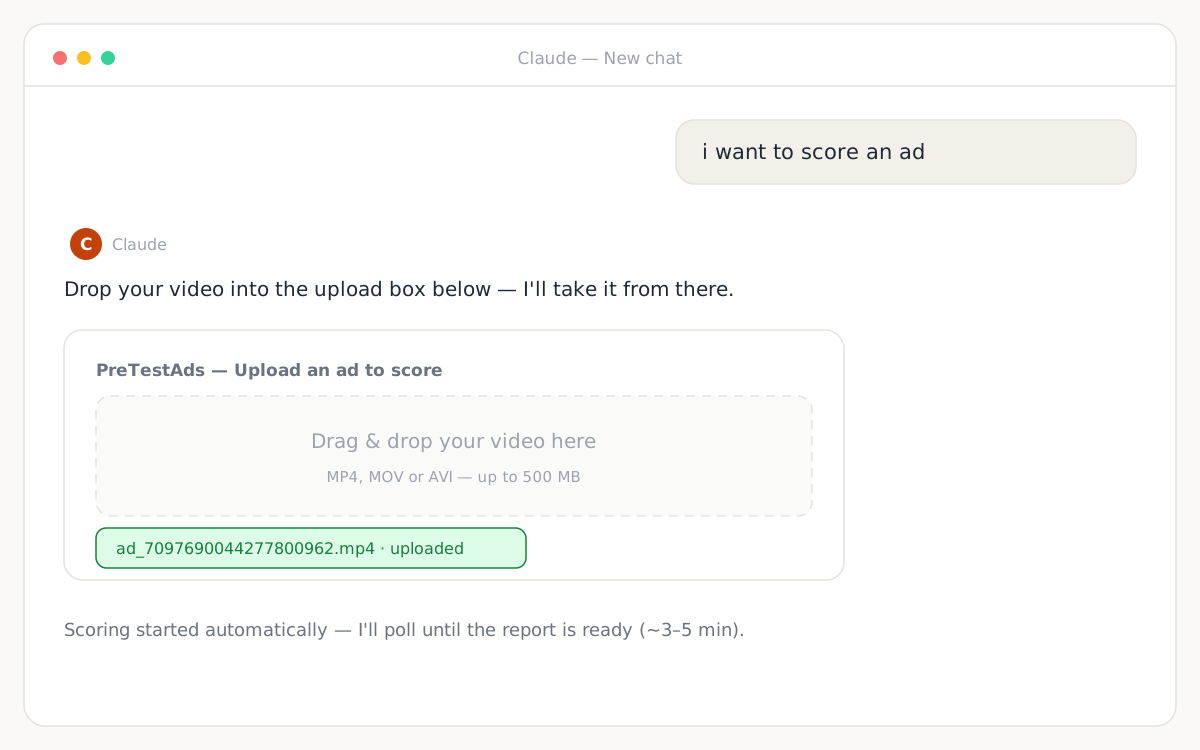
get_ad_score
A full report, read back in plain English
Hook strength, peak moment, purchase signal, zone split, and the second-by-second engagement timeseries — the same data as the web report, delivered as a conversation you can interrogate. Free for any completed run.
Show me the full report and chart the attention curve.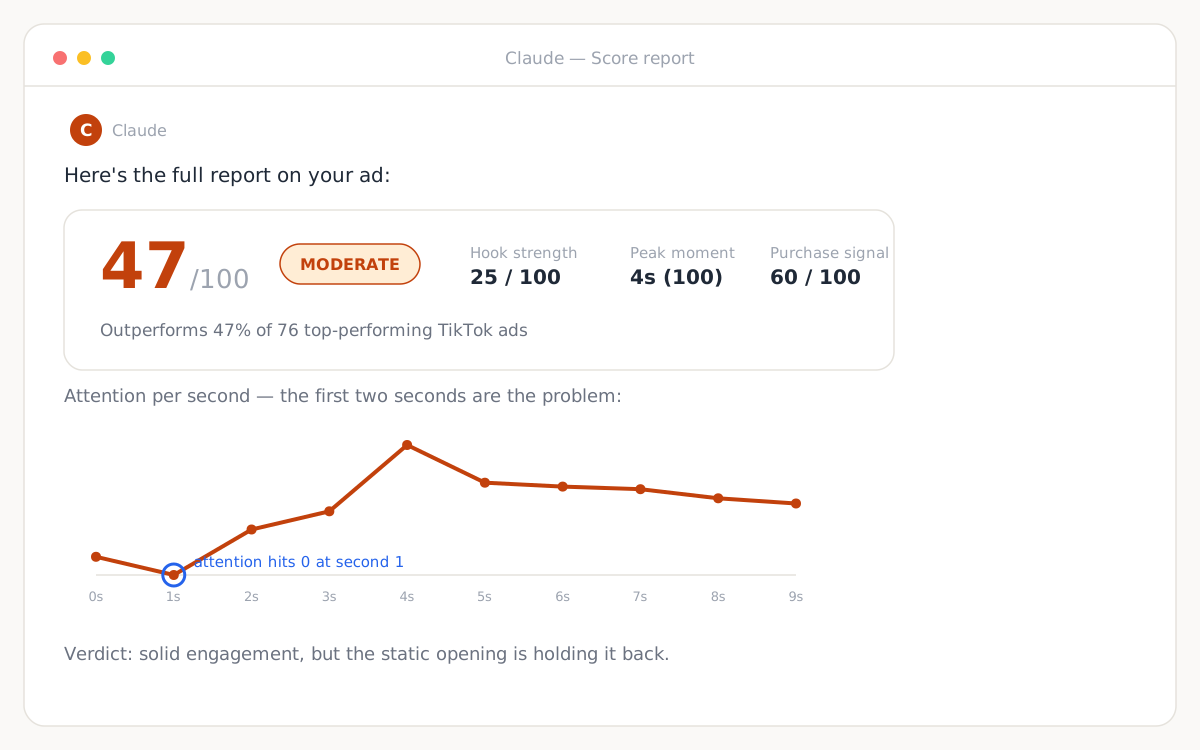
get_ad_frames · AdRetina™
Claude watches your ad — literally
Powered by AdRetina™, our vision layer: one still per second from your scored video, straight into Claude's vision. It maps what's on screen to the exact seconds where attention rises or dies — turning a number into scene-level edit advice. Free, no credits.
Watch it frame by frame and tell me exactly which second to fix.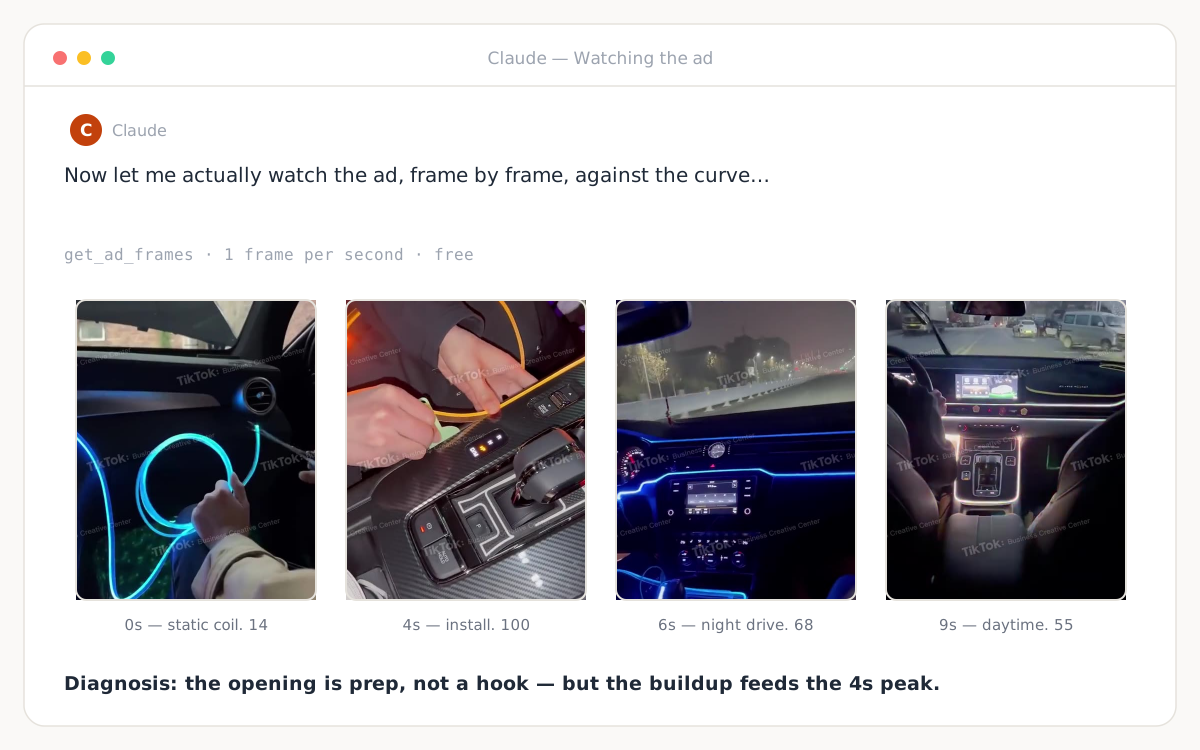
Two MCPs, one loop
Pair it with a generation MCP and close the loop
With a video-generation connector like Higgsfield in the same chat, Claude can pull a reference frame from your scored ad, generate matching new footage, splice it in with ffmpeg, and score the hybrid. Make → test → fix, with a number as the referee at every step.
use the higgsfield mcp to get the footage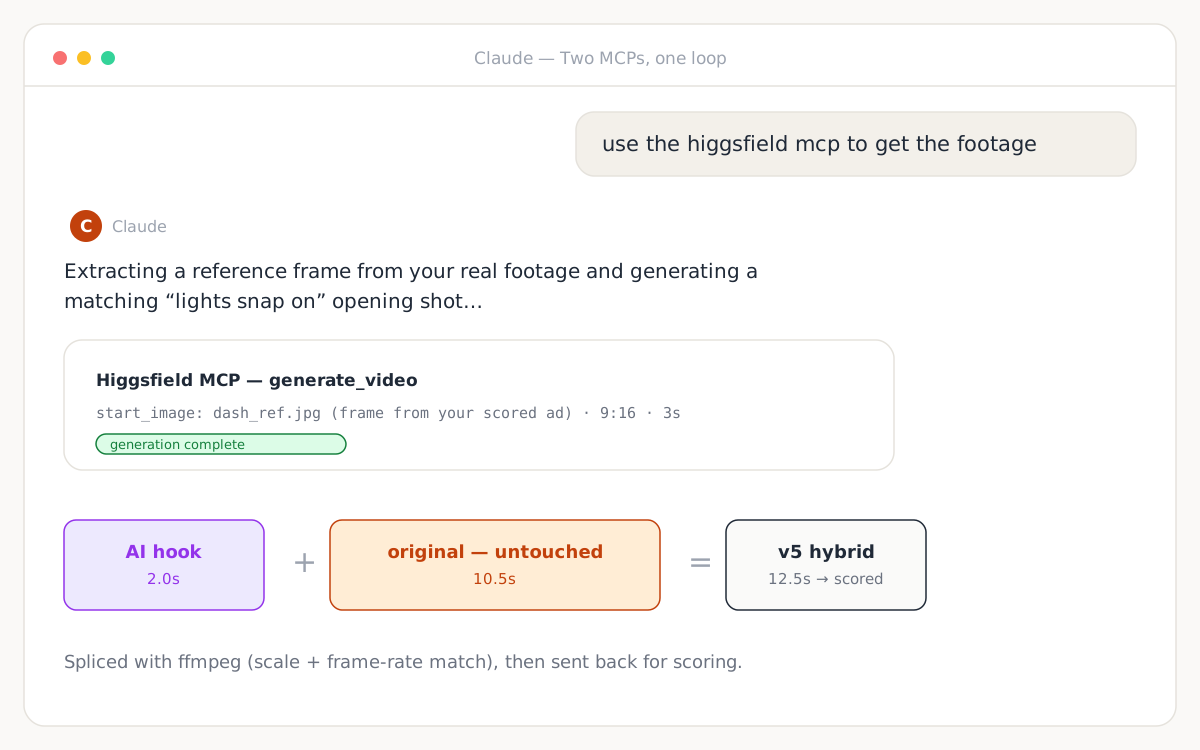
list_ad_scores · check_credits · mark_ad_converted
Compare versions and let the best number win
Every run is logged to your account, so Claude can line up versions, chart them, and call a winner. When an ad converts in the real world, tell Claude to mark it — that feedback sharpens the benchmark. See it play out in the six-round case study.
List my last six scores and tell me which version to ship.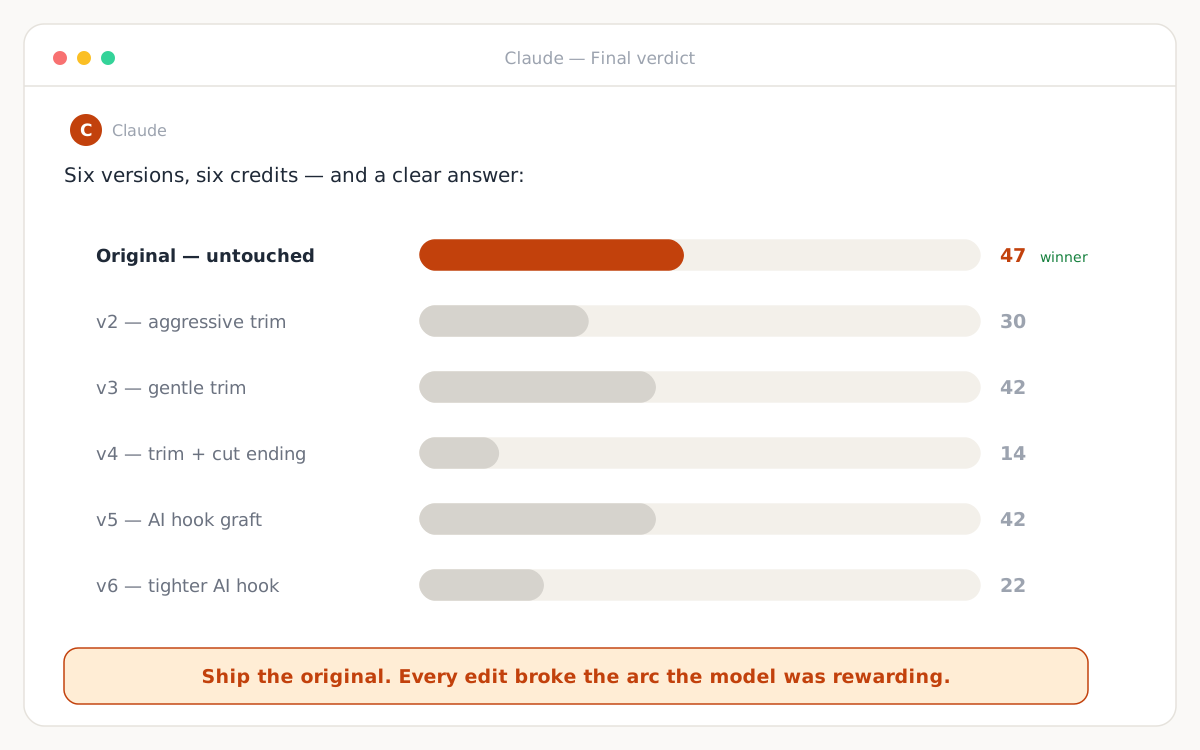
New · Facebook Ad Spy
It doesn't just score your ad anymore.
It reads your competitors' entire playbook.
Point Claude at any advertiser in the public Meta Ad Library. It scores every live ad they run for attention, weighs it against how hard they're paying to keep it running, and gives you a one-word verdict on each — the thing a spy tool database physically cannot do.
Advertiser conviction × creative attention
HIDDEN GEM
Great creative nobody's backing — steal it early
MODEL IT
Proven winner — copy the structure
SKIP
Nothing to learn or beat
OUT-HOOK IT
They're committed to weak creative — beat it
Creative attention score →
score_facebook_ad1 creditHand it a competitor's Meta Ad Library ad — Claude reads the video, scores it, and links it back to the library. No upload box, no download; it fetches the ad itself.
advertiser_convictionfreeHow hard is an advertiser really betting on an ad? A 0–100 read from Meta's own disclosed facts — run length, variant count, placements. Revealed preference, never a made-up spend number.
worth_modelingfreeThe verdict: MODEL IT · OUT-HOOK IT · HIDDEN GEM · SKIP — plus the exact seconds worth stealing from the ad.
compare_ad_scoresfreeBeat the control: line your version up against the competitor's and see, second by second, exactly where you win and lose — before you spend.
Public ads only, the same research ad teardown channels do — your agent browses, our server judges.
Got any questions left?
How does PreTestAds connect to Claude?
PreTestAds uses MCP (Model Context Protocol), an open standard that gives AI agents access to external tools. Add https://pretestads.com/mcp as a custom connector in Claude's Settings → Connectors, sign in with your PreTestAds account, and Claude can score ads, read reports, and watch scored videos frame by frame — all in one chat.
Do I need an API key?
No. Authentication is an OAuth sign-in with your PreTestAds account — no keys to manage. Scoring runs bill your account credits, the same credits the website uses.
What can Claude score through the MCP?
Video ads (MP4, MOV, AVI up to 500MB) via an in-chat upload box or a public URL, static images (JPG, PNG, WebP — converted to a 10-second stimulus), audio ads, and raw ad copy as text. Every run returns a 0–100 percentile against 76 top-performing TikTok ads plus a second-by-second attention curve.
What does a run cost?
One account credit per scored ad. Reading reports, listing past runs, checking credits, and extracting frames from scored videos are free. Agents without an account can use the x402 API instead at $5 USDC per run.
Can the MCP spy on competitors' Facebook ads?
Yes. With a browser-capable agent, Claude opens the public Meta Ad Library, finds a competitor's live ads, and calls score_facebook_ad — the server downloads and scores each one for attention. advertiser_conviction rates how hard they're paying to run it (from Meta-disclosed run length, variant count, and placements — never a fabricated spend estimate), and worth_modeling returns a MODEL IT / OUT-HOOK IT / HIDDEN GEM / SKIP verdict. It's the judgment layer a spy-tool database can't provide.
Can Claude fix a weak ad, not just score it?
Yes — that's the loop. Claude reads the curve, watches the exact seconds where attention drops, re-cuts the file or generates new footage with a paired generation MCP like Higgsfield, and scores the new version. In our published case study Claude ran six scoring rounds in one conversation.
Does the MCP work outside Claude?
Any MCP-compatible client can connect to https://pretestads.com/mcp. For Claude Code and terminal agents there's also a plugin (/plugin marketplace add krecicki/pretestads-claude-plugin) and an open-source toolkit with clients for OpenAI, Gemini, LangChain, CrewAI, and the Vercel AI SDK.
From upload to verdict in one conversation
Add the connector, type "i want to score an ad," and drop a video in.
Create Your Free AccountThen connect https://pretestads.com/mcp in Claude's Settings → Connectors.
Frequently asked questions
How does PreTestAds connect to Claude?
PreTestAds uses MCP (Model Context Protocol), an open standard that gives AI agents access to external tools. Add https://pretestads.com/mcp as a custom connector in Claude's Settings → Connectors, sign in with your PreTestAds account, and Claude can score ads, read reports, and watch scored videos frame by frame — all in one chat.
Do I need an API key?
No. Authentication is an OAuth sign-in with your PreTestAds account — no keys to manage. Scoring runs bill your account credits, the same credits the website uses.
What can Claude score through the MCP?
Video ads (MP4, MOV, AVI up to 500MB) via an in-chat upload box or a public URL, static images (JPG, PNG, WebP — converted to a 10-second stimulus), audio ads, and raw ad copy as text. Every run returns a 0–100 percentile against 76 top-performing TikTok ads plus a second-by-second attention curve.
What does a run cost?
One account credit per scored ad. Reading reports, listing past runs, checking credits, and extracting frames from scored videos are free. Agents without an account can use the x402 API instead at $5 USDC per run.
Can the MCP spy on competitors' Facebook ads?
Yes. With a browser-capable agent, Claude opens the public Meta Ad Library, finds a competitor's live ads, and calls score_facebook_ad — the server downloads and scores each one for attention. advertiser_conviction rates how hard they're paying to run it (from Meta-disclosed run length, variant count, and placements — never a fabricated spend estimate), and worth_modeling returns a MODEL IT / OUT-HOOK IT / HIDDEN GEM / SKIP verdict. It's the judgment layer a spy-tool database can't provide.
Can Claude fix a weak ad, not just score it?
Yes — that's the loop. Claude reads the curve, watches the exact seconds where attention drops, re-cuts the file or generates new footage with a paired generation MCP like Higgsfield, and scores the new version. In our published case study Claude ran six scoring rounds in one conversation.
Does the MCP work outside Claude?
Any MCP-compatible client can connect to https://pretestads.com/mcp. For Claude Code and terminal agents there's also a plugin (/plugin marketplace add krecicki/pretestads-claude-plugin) and an open-source toolkit with clients for OpenAI, Gemini, LangChain, CrewAI, and the Vercel AI SDK.